

api.acme.com) instead of a *.unkey.app subdomain. Unkey handles TLS certificate provisioning and renewal automatically.
Add a custom domain
1
Open domain settings
Navigate to your project in the dashboard and click Settings. Scroll to the Custom domains section.
2
Enter your domain
Select the environment and enter the fully qualified domain name you want to use (for example, 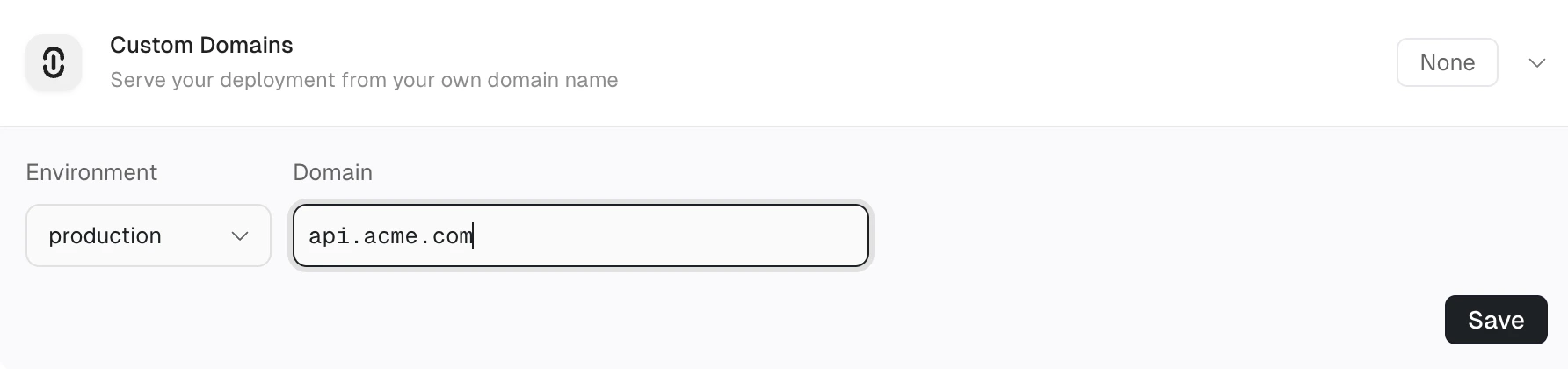
api.acme.com).3
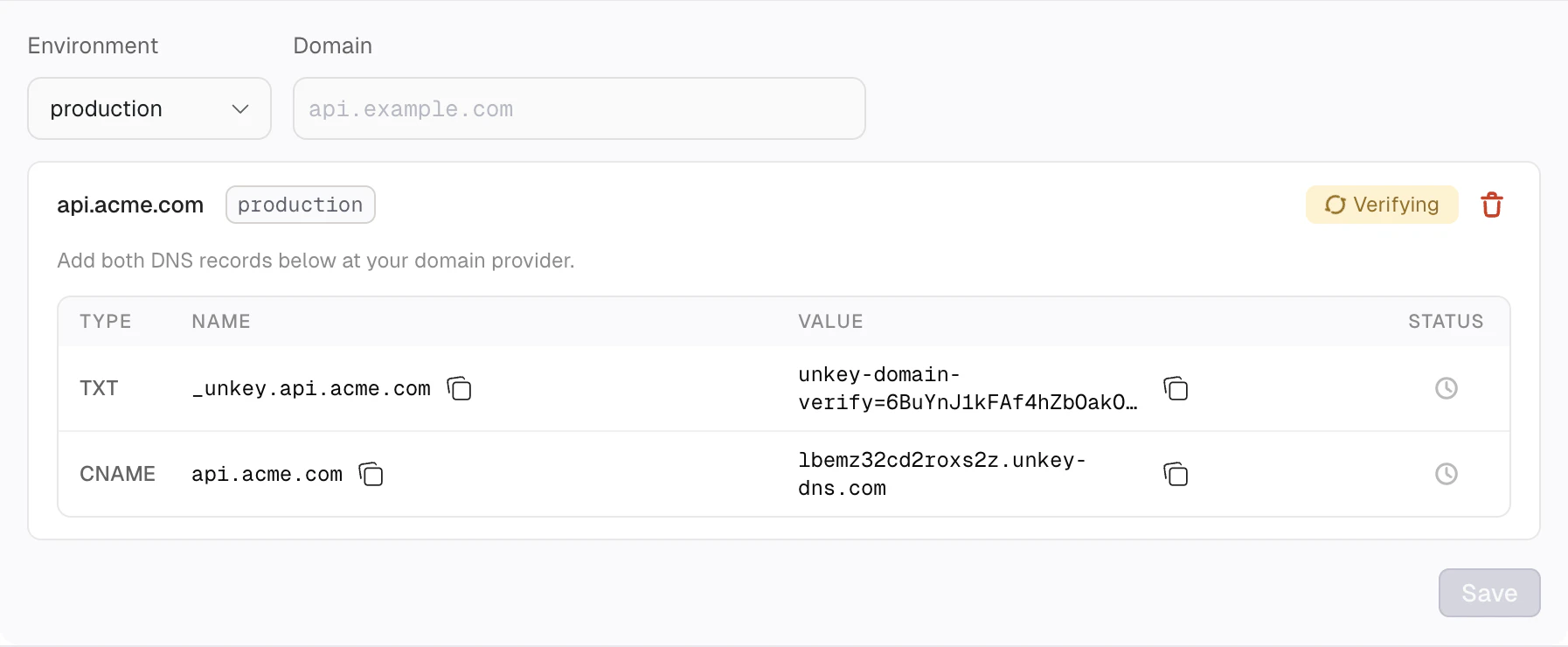
Configure DNS records
After you add a domain, Unkey checks whether your DNS provider supports automatic setup. If it does, you can configure your DNS records with one click. Otherwise, you add the records manually.
- Automatic setup
- Manual setup
If your DNS provider supports the Domain Connect protocol, an Automatic setup available card appears with your provider’s name. Click Connect to open your DNS provider’s consent page, approve the changes, and the required DNS records are created for you automatically.After you approve, Unkey begins verification immediately. No manual DNS configuration is needed.The following providers are supported for automatic setup:
- Cloudflare
- Vercel DNS
Automatic setup works for subdomains out of the box. For apex (root) domains, some providers like Cloudflare (via CNAME flattening) and Vercel (via ALIAS records through Domain Connect) also support automatic setup. If your provider does not support these features, configure DNS manually instead.
Certificate provisioning
After DNS verification succeeds, Unkey provisions a TLS certificate from Let’s Encrypt using an ACME HTTP-01 challenge. Frontline serves the challenge token automatically during this process. Certificates renew before expiration without any action from you.If Let’s Encrypt rate limits are reached, certificate issuance retries automatically with backoff. This can add up to two hours of delay in rare cases.
DNS provider examples
If your provider supports automatic setup, you can skip these steps and use the one-click Connect button instead.- Cloudflare
- Route53
- Vercel
- Open your domain in the Cloudflare dashboard.
- Click DNS in the sidebar.
- Click Add record.
- Add the TXT record with name
_unkey.{your-subdomain}and the verification value. - Add the CNAME record with name
{your-subdomain}and the target from your Unkey dashboard. - Set the CNAME proxy status to DNS only (gray cloud) so Unkey can terminate TLS directly.
Troubleshooting
Domain stuck in verifying
Domain stuck in verifying
Confirm your DNS records have propagated. TXT records can take up to 48 hours to propagate, depending on your DNS provider. You can check propagation with:
Certificate not issued after verification
Certificate not issued after verification
Certificate provisioning starts automatically after both DNS records are verified. If the certificate isn’t issued within 30 minutes, check that your CNAME proxy status is set to DNS only (not proxied) at your DNS provider.
Duplicate domain error
Duplicate domain error
A domain can only be added once per workspace. If you see a duplicate domain error, check whether the domain already exists in your workspace, possibly in a different project or environment. Remove the existing entry before adding it again.