

Change build settings
Edit them under App Settings in the dashboard, withenvironments.updateSettings in the API, or with unkey api environments update-settings in the CLI. In the API, send only the fields you want to change. To read the current values, call environments.getEnvironment and look under build.
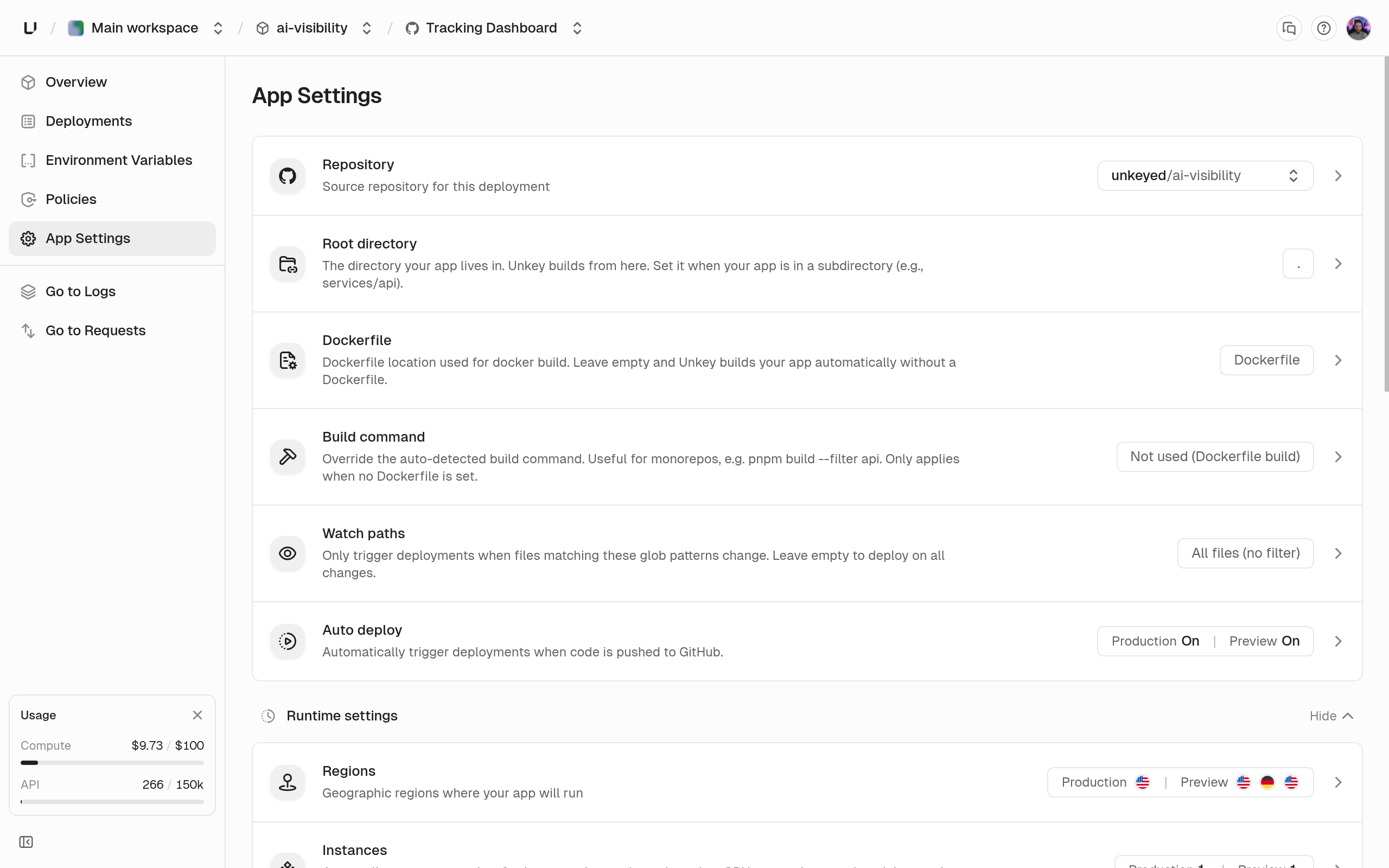
Fields
string | null
Path to the Dockerfile, relative to the root directory, 1 to 500 characters. When it’s unset (the default), we detect your language and build without a Dockerfile. Send
null to go back to automatic builds. In the dashboard, the Dockerfile card lists Dockerfiles in your repository and shows “File not found on this branch” if the path is missing. See Dockerfile builds.string
default:"."
The directory we build from, 1 to 500 characters. Automatic detection looks here, and a Dockerfile build uses it as the build context. Use
. or a relative path like services/api with letters, digits, ., _, and -. A path that starts with / or ./, or contains .., a backslash, or spaces, returns “Root directory must be a relative path like ‘api’ or ‘services/api’.” The dashboard suggests app directories it finds in your repository.string | null
Replaces the build command automatic detection would run, 1 to 1000 characters, for example
pnpm --filter api build. Ignored when a Dockerfile is set, and the dashboard disables the field with “Disabled because a Dockerfile is configured. Build commands only apply to automatic (Railpack) builds.” Send null to go back to the detected command.string[]
default:"[]"
Glob patterns that decide whether a push builds. Up to 10 patterns, each up to 500 characters. When the list is empty, every push builds. Otherwise a push builds only if a changed file matches a pattern.
src/** matches everything under src, and **/*.go matches every Go file. A pattern without a wildcard matches only that exact path, so src isn’t the same as src/**. Don’t start a pattern with / or ./. An invalid pattern returns 400 when you save it. See GitHub integration.boolean
default:"true"
Whether GitHub pushes create deployments in this environment. When it’s off, a push shows up as a
skipped deployment with “Auto deploy is disabled for this environment.” A common setup is auto deploy on for preview and off for production: every branch gets a preview, and you release to production on purpose from the dashboard, API, or CLI.Example
Set a Dockerfile and scope the build to a subdirectory
Next steps
Builds
How builds run, why they wait or fail, and caching.
Runtime settings
Port, CPU, memory, disk, command, protocol, regions.