> ## Documentation Index
> Fetch the complete documentation index at: https://unkey.com/docs/llms.txt
> Use this file to discover all available pages before exploring further.
> ## Agent Instructions
> Unkey is two separate products. Compute builds, deploys, and runs apps behind a gateway. API Management issues API keys, enforces rate limits, manages identities and permissions, and reports usage. Say which product a page belongs to; a reader can use either without the other.
> Every Unkey API endpoint is an HTTP POST to https://api.unkey.com/v2/{service}.{procedure} with a root key in the Authorization: Bearer header. Root keys are workspace scoped.
> Error codes have the form err:{system}:{category}:{specific} and each has a page at /errors/{system}/{category}/{specific}.
> The word environment means production or preview in Compute. Rate limiting has four meanings on this site; the glossary lists them.
# Plans
> See what the API Management tiers and Compute plans include and how a change takes effect.
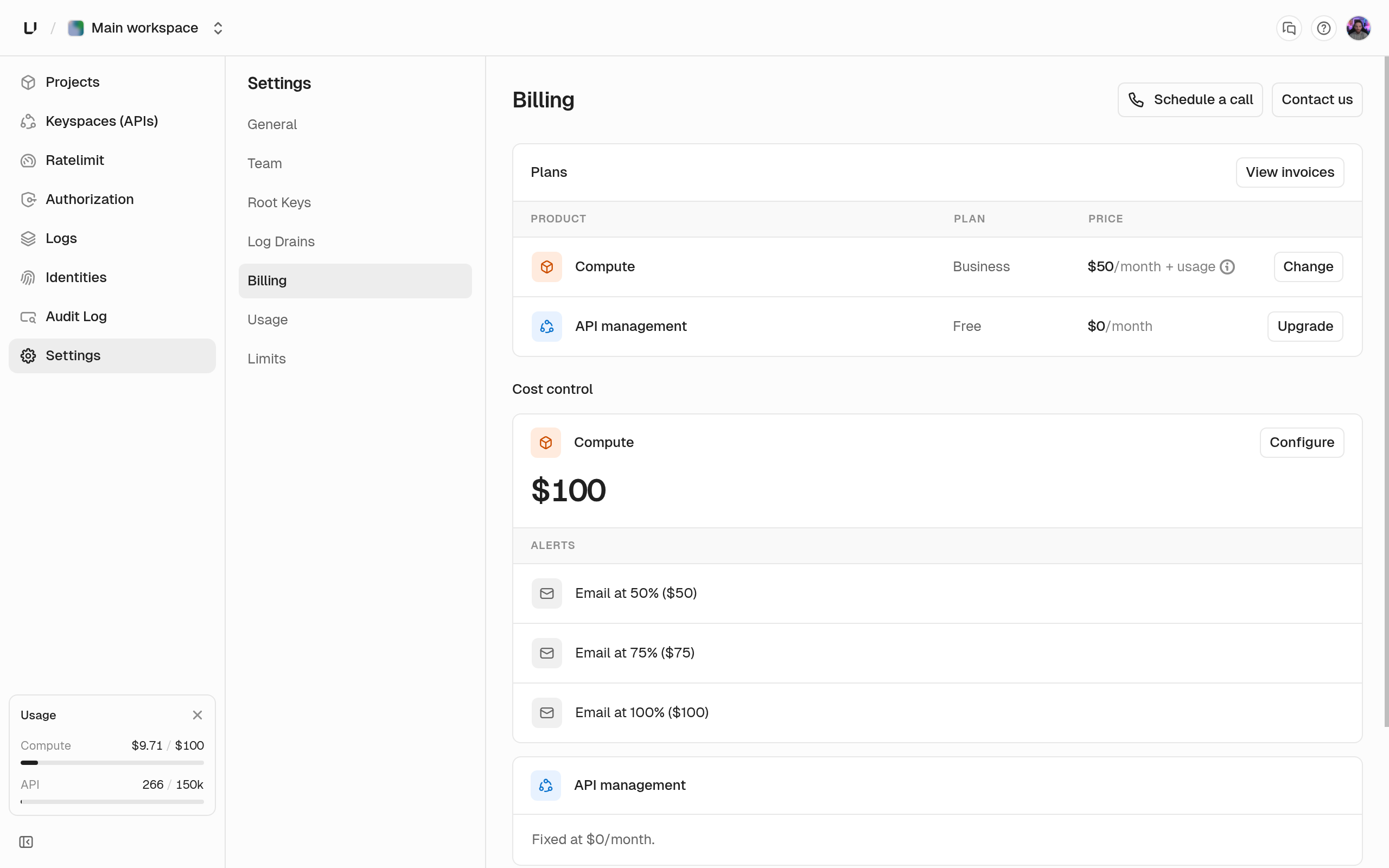
Your workspace pays for the two products separately. API Management has a tier and Compute has a plan, and you can have either one without the other. Both use one payment method and one set of invoices.
Manage both under **Settings > Billing**. Only [admins](/docs/platform/workspace/team) can change plans or payment details. Everyone else sees the controls disabled with "Admin access required to manage billing".
 ## API Management tier
Every workspace starts on the **Free** tier: 150,000 billable operations per month, 1,000 API keys, 1 day of request log retention, and 3 days of audit log retention. Billable operations are key verifications and rate limit operations. See [Usage](/docs/platform/billing/usage) for what counts.
A paid tier raises the monthly quota and both retention periods, and includes [team members](/docs/platform/workspace/team). Each tier's numbers are on [Limits](/docs/platform/billing/limits) and [unkey.com/pricing](https://unkey.com/pricing), and the billing page shows them when you choose.
## Compute plan
You need a Compute plan before you can deploy an app. There are three:
* **Starter** for hobby projects and testing ideas.
* **Pro** for growing apps in production.
* **Business** for teams scaling up.
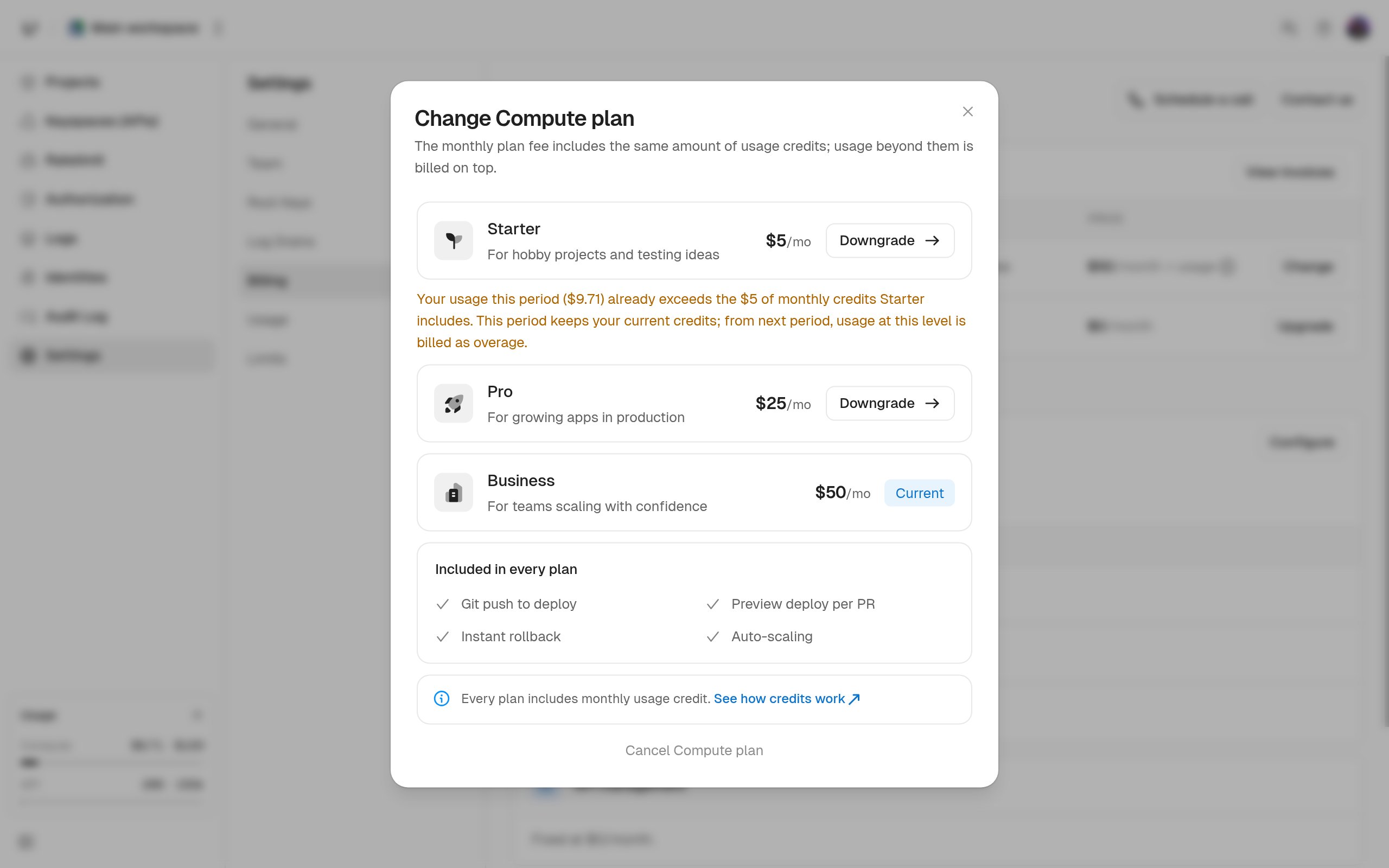
Every plan includes git push to deploy, a preview environment per pull request, instant rollback, autoscaling, and a monthly usage credit. The plans differ in their resource limits (CPU, memory, disk, replicas, and custom domains), listed on [Limits](/docs/platform/billing/limits). Pro and Business also include team members, so they give a team to a workspace on the free API tier.
Pick a plan under **Settings > Billing** in the **Choose a Compute plan** dialog. If you try to create a project or deploy without one, the dashboard opens the same dialog.
## API Management tier
Every workspace starts on the **Free** tier: 150,000 billable operations per month, 1,000 API keys, 1 day of request log retention, and 3 days of audit log retention. Billable operations are key verifications and rate limit operations. See [Usage](/docs/platform/billing/usage) for what counts.
A paid tier raises the monthly quota and both retention periods, and includes [team members](/docs/platform/workspace/team). Each tier's numbers are on [Limits](/docs/platform/billing/limits) and [unkey.com/pricing](https://unkey.com/pricing), and the billing page shows them when you choose.
## Compute plan
You need a Compute plan before you can deploy an app. There are three:
* **Starter** for hobby projects and testing ideas.
* **Pro** for growing apps in production.
* **Business** for teams scaling up.
Every plan includes git push to deploy, a preview environment per pull request, instant rollback, autoscaling, and a monthly usage credit. The plans differ in their resource limits (CPU, memory, disk, replicas, and custom domains), listed on [Limits](/docs/platform/billing/limits). Pro and Business also include team members, so they give a team to a workspace on the free API tier.
Pick a plan under **Settings > Billing** in the **Choose a Compute plan** dialog. If you try to create a project or deploy without one, the dashboard opens the same dialog.
 Usage above the included credit is billed by CPU hours, memory GiB-hours, disk GiB-hours, and egress. To cap it, set a monthly [spend budget](/docs/compute/configure/spend-budget). It emails you at 50, 75, and 100 percent and can stop your usage at 100 percent.
## Add a payment method
You need a card on file before you can upgrade. Under **Settings > Billing**, click **Add payment method** and enter the card in Stripe checkout. Both products charge that card. To see invoices or change the card later, click **Open Portal** on the **Billing Portal** card.
## Change or cancel the API tier
Choose a tier under **Settings > Billing**.
* **Upgrade.** Applies immediately.
* **Downgrade or cancel.** Takes effect at the end of the current period. The page shows the date, and you can resume your current tier until then. While a cancellation is pending you can't pick another tier, and you'll see "Resume your API plan before changing it."
When a cancellation takes effect, the workspace moves to the free tier, and the free tier's quota and retention apply.
## Change or cancel Compute
Choose a new plan in the **Change Compute plan** dialog under **Settings > Billing**. The timing is different from the API tier:
* **Upgrade.** You're charged the prorated fee difference right away and get more usage credit for the rest of the period.
* **Downgrade.** Your [limits](/docs/platform/billing/limits) drop right away. The fee difference isn't refunded, and you keep the usage credit the old fee gave you. The lower fee and credit start at the next renewal.
* **Cancel.** Click **Cancel Compute**. It takes effect immediately, not at the end of the period. We tear down your running deployments right away and stop billing further usage. Usage up to that point is billed as normal, and the fee isn't refunded.
If you pick a Compute plan again before the canceled period ends, we resume that subscription instead of charging a new fee. Picking a higher plan than the one you canceled charges the prorated difference. Your deployments don't come back on their own, so deploy again once the plan is active.
Canceling one product doesn't affect the other. You can drop Compute and keep a paid API tier, or the reverse.
## What happens to your team when you downgrade
Team members come with any paid API tier, or with Compute Pro or Business. If the workspace loses all of these, we deactivate every member except the one who created the workspace. That happens when:
* A paid API tier ends at the end of its period, and you don't have Compute Pro or Business.
* You're on the free API tier and downgrade Compute to Starter or cancel it.
Usage above the included credit is billed by CPU hours, memory GiB-hours, disk GiB-hours, and egress. To cap it, set a monthly [spend budget](/docs/compute/configure/spend-budget). It emails you at 50, 75, and 100 percent and can stop your usage at 100 percent.
## Add a payment method
You need a card on file before you can upgrade. Under **Settings > Billing**, click **Add payment method** and enter the card in Stripe checkout. Both products charge that card. To see invoices or change the card later, click **Open Portal** on the **Billing Portal** card.
## Change or cancel the API tier
Choose a tier under **Settings > Billing**.
* **Upgrade.** Applies immediately.
* **Downgrade or cancel.** Takes effect at the end of the current period. The page shows the date, and you can resume your current tier until then. While a cancellation is pending you can't pick another tier, and you'll see "Resume your API plan before changing it."
When a cancellation takes effect, the workspace moves to the free tier, and the free tier's quota and retention apply.
## Change or cancel Compute
Choose a new plan in the **Change Compute plan** dialog under **Settings > Billing**. The timing is different from the API tier:
* **Upgrade.** You're charged the prorated fee difference right away and get more usage credit for the rest of the period.
* **Downgrade.** Your [limits](/docs/platform/billing/limits) drop right away. The fee difference isn't refunded, and you keep the usage credit the old fee gave you. The lower fee and credit start at the next renewal.
* **Cancel.** Click **Cancel Compute**. It takes effect immediately, not at the end of the period. We tear down your running deployments right away and stop billing further usage. Usage up to that point is billed as normal, and the fee isn't refunded.
If you pick a Compute plan again before the canceled period ends, we resume that subscription instead of charging a new fee. Picking a higher plan than the one you canceled charges the prorated difference. Your deployments don't come back on their own, so deploy again once the plan is active.
Canceling one product doesn't affect the other. You can drop Compute and keep a paid API tier, or the reverse.
## What happens to your team when you downgrade
Team members come with any paid API tier, or with Compute Pro or Business. If the workspace loses all of these, we deactivate every member except the one who created the workspace. That happens when:
* A paid API tier ends at the end of its period, and you don't have Compute Pro or Business.
* You're on the free API tier and downgrade Compute to Starter or cancel it.