> ## Documentation Index
> Fetch the complete documentation index at: https://unkey.com/docs/llms.txt
> Use this file to discover all available pages before exploring further.
> ## Agent Instructions
> Unkey is two separate products. Compute builds, deploys, and runs apps behind a gateway. API Management issues API keys, enforces rate limits, manages identities and permissions, and reports usage. Say which product a page belongs to; a reader can use either without the other.
> Every Unkey API endpoint is an HTTP POST to https://api.unkey.com/v2/{service}.{procedure} with a root key in the Authorization: Bearer header. Root keys are workspace scoped.
> Error codes have the form err:{system}:{category}:{specific} and each has a page at /errors/{system}/{category}/{specific}.
> The word environment means production or preview in Compute. Rate limiting has four meanings on this site; the glossary lists them.
# Gateway policies
> Add gateway policies to an environment, choose which requests they apply to, and put them in order.
A policy is one rule the [gateway](/docs/compute/gateway/overview) applies to the requests you pick, such as "require an API key" or "100 requests per minute". Each environment of an app has its own list, so production and preview can have different rules.
Each deployment keeps the policies it was created with. Adding, editing, turning off, or deleting a policy only affects the next deployment. Redeploy to apply a change.
## Add a policy in the dashboard
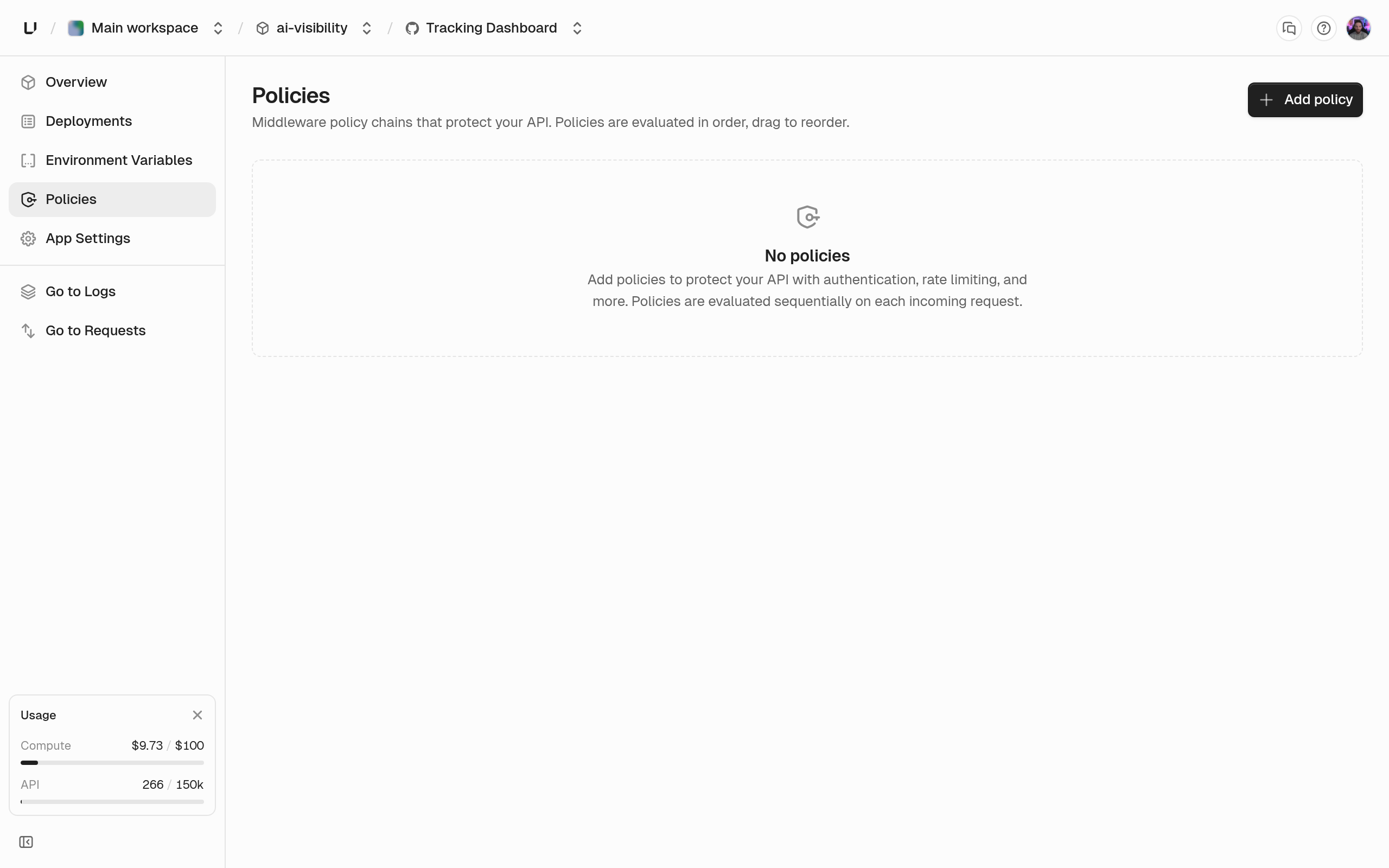
1. Open the app and click **Policies** in the sidebar.
2. Click **Add Policy** and pick a type: Key Auth, Rate Limit, Firewall, OpenAPI Validation, or Logging.
3. Pick the environment. The default, **All Environments**, adds the same policy to both production and preview.
4. Add match conditions if the policy should only apply to some requests.
5. Save, then redeploy.
 You can't have two policies with the same type and name in one environment. The dashboard suggests adding the existing policy to the other environment instead.
The dashboard steps above correspond to `POST /v2/gateway.setPolicies` with the environment's complete policy list, or `POST /v2/gateway.updatePolicy` to change one policy. To scope a policy to one environment, call the endpoint once with that environment's slug. Read the current list first with `POST /v2/gateway.listPolicies`. The ids it returns are the only valid `policyId` values for `updatePolicy`.
## Set policies with the API
Each endpoint takes the `project`, `app`, and `environment` by ID or slug.
* **`gateway.listPolicies`** returns the list in the order it runs, with IDs.
* **`gateway.setPolicies`** replaces the whole list with the `policies` array you send, in that order. If any policy is invalid, nothing is saved. An empty array removes every policy. Every policy gets a new ID.
* **`gateway.updatePolicy`** changes one policy by `policyId`. Fields you leave out keep their values, and `match: null` removes all match expressions. Sending one of `keyauth`, `ratelimit`, `firewall`, `openapi`, or `logging` replaces the rule and can change its type.
```bash theme={"system"}
curl -X POST https://api.unkey.com/v2/gateway.setPolicies \
-H "Authorization: Bearer $UNKEY_ROOT_KEY" \
-H "Content-Type: application/json" \
-d '{
"project": "my-project",
"app": "api",
"environment": "production",
"policies": [
{
"name": "Require a key",
"enabled": true,
"keyauth": { "keyspaces": ["ks_1234abcd"] }
},
{
"name": "100 per minute per key",
"enabled": true,
"ratelimit": {
"limit": 100,
"windowMs": 60000,
"identifiers": [{ "authenticatedSubject": {} }]
}
}
]
}'
```
Your root key needs `environment.*.set_policies` to replace the list, `environment.*.read_policies` to list, and `environment.*.update_policy` to change one, or the same actions on `environment..…`. See [root key permissions](/docs/platform/root-keys/permissions). A keyspace in an authentication policy must be in the same workspace, or the call fails with [`err:unkey:data:key_space_not_found`](/docs/errors/unkey/data/key_space_not_found).
Every change, from the dashboard, API, or CLI, is recorded in the audit log with the full policy list.
## Set policies with the CLI
`unkey api gateway list-policies`, `set-policies`, and `update-policy` do the same as the three endpoints. Each takes `--project`, `--app`, and `--environment`. `set-policies` takes the full list as `--policies ''`, and `update-policy` takes `--policy-id` and `--policy ''`.
## What's in a policy
Shown in the dashboard. 1 to 256 characters.
A turned-off policy is kept but skipped.
Up to 10 expressions. A request must match all of them for the policy to apply. Leave it out to apply the policy to every request.
Set exactly one. It picks the policy type and holds its settings. See [API key authentication](/docs/compute/gateway/api-key-auth), [Rate limit](/docs/compute/gateway/rate-limiting), [Firewall](/docs/compute/gateway/firewall), [OpenAPI validation](/docs/compute/gateway/openapi-validation), and [Logging](/docs/compute/gateway/logging).
Saved policies also have an `id`. It changes every time `gateway.setPolicies` replaces the list.
## Pick which requests a policy applies to
Each match expression sets exactly one of `path`, `method`, `header`, or `queryParam`. A request must match every expression in the policy. To match one thing or another, create two policies.
Matches the request path. Set exactly one of `exact`, `prefix`, or `regex` (1 to 1024 characters), and optionally `ignoreCase: true`. Regular expressions use RE2 syntax, and one that doesn't compile is rejected when you save.
One or more of `GET`, `POST`, `PUT`, `PATCH`, `DELETE`, `HEAD`, `OPTIONS`. Matches any of them, ignoring case.
`name` (1 to 256 characters) plus exactly one of `present: true` or `value` (a `StringMatch` like `path`). With `value`, it matches if any value of that header matches.
Same as `header`, for a query parameter. Names are case-sensitive.
```json Example: block POST and DELETE on internal paths theme={"system"}
{
"name": "Block internal paths",
"enabled": true,
"match": [
{ "path": { "path": { "prefix": "/internal/" } } },
{ "method": { "methods": ["POST", "DELETE"] } }
],
"firewall": { "action": "ACTION_DENY" }
}
```
## Put policies in the right order
The gateway runs every enabled policy that matches, from top to bottom. Order matters in three ways:
* **Authentication first.** The first API key policy that succeeds decides who the caller is. Later API key policies are skipped.
* **Rate limits by caller go after authentication.** A rate limit that counts by `authenticatedSubject` or `principalField` needs to know the caller. If it runs first, every request counts as `unknown`.
* **A rejection stops everything.** After a firewall block, a failed key check, a used-up rate limit, or an OpenAPI error, no later policy runs, including logging.
Logging policies never reject. If several match, the request is logged with all of their settings combined.
## Limits
* 50 policies per environment.
* 10 match expressions per policy.
* 5 keyspaces and 10 key rate limits per API key policy.
* 5 identifiers per rate limit policy.
* Match strings up to 1024 characters, and names up to 256.
## Next steps
Verify Unkey keys and forward the principal.
Limit by IP, header, path, subject, or principal field.
Deny the requests your match expressions select.
Capture headers, query data, and bodies for matched requests.
You can't have two policies with the same type and name in one environment. The dashboard suggests adding the existing policy to the other environment instead.
The dashboard steps above correspond to `POST /v2/gateway.setPolicies` with the environment's complete policy list, or `POST /v2/gateway.updatePolicy` to change one policy. To scope a policy to one environment, call the endpoint once with that environment's slug. Read the current list first with `POST /v2/gateway.listPolicies`. The ids it returns are the only valid `policyId` values for `updatePolicy`.
## Set policies with the API
Each endpoint takes the `project`, `app`, and `environment` by ID or slug.
* **`gateway.listPolicies`** returns the list in the order it runs, with IDs.
* **`gateway.setPolicies`** replaces the whole list with the `policies` array you send, in that order. If any policy is invalid, nothing is saved. An empty array removes every policy. Every policy gets a new ID.
* **`gateway.updatePolicy`** changes one policy by `policyId`. Fields you leave out keep their values, and `match: null` removes all match expressions. Sending one of `keyauth`, `ratelimit`, `firewall`, `openapi`, or `logging` replaces the rule and can change its type.
```bash theme={"system"}
curl -X POST https://api.unkey.com/v2/gateway.setPolicies \
-H "Authorization: Bearer $UNKEY_ROOT_KEY" \
-H "Content-Type: application/json" \
-d '{
"project": "my-project",
"app": "api",
"environment": "production",
"policies": [
{
"name": "Require a key",
"enabled": true,
"keyauth": { "keyspaces": ["ks_1234abcd"] }
},
{
"name": "100 per minute per key",
"enabled": true,
"ratelimit": {
"limit": 100,
"windowMs": 60000,
"identifiers": [{ "authenticatedSubject": {} }]
}
}
]
}'
```
Your root key needs `environment.*.set_policies` to replace the list, `environment.*.read_policies` to list, and `environment.*.update_policy` to change one, or the same actions on `environment..…`. See [root key permissions](/docs/platform/root-keys/permissions). A keyspace in an authentication policy must be in the same workspace, or the call fails with [`err:unkey:data:key_space_not_found`](/docs/errors/unkey/data/key_space_not_found).
Every change, from the dashboard, API, or CLI, is recorded in the audit log with the full policy list.
## Set policies with the CLI
`unkey api gateway list-policies`, `set-policies`, and `update-policy` do the same as the three endpoints. Each takes `--project`, `--app`, and `--environment`. `set-policies` takes the full list as `--policies ''`, and `update-policy` takes `--policy-id` and `--policy ''`.
## What's in a policy
Shown in the dashboard. 1 to 256 characters.
A turned-off policy is kept but skipped.
Up to 10 expressions. A request must match all of them for the policy to apply. Leave it out to apply the policy to every request.
Set exactly one. It picks the policy type and holds its settings. See [API key authentication](/docs/compute/gateway/api-key-auth), [Rate limit](/docs/compute/gateway/rate-limiting), [Firewall](/docs/compute/gateway/firewall), [OpenAPI validation](/docs/compute/gateway/openapi-validation), and [Logging](/docs/compute/gateway/logging).
Saved policies also have an `id`. It changes every time `gateway.setPolicies` replaces the list.
## Pick which requests a policy applies to
Each match expression sets exactly one of `path`, `method`, `header`, or `queryParam`. A request must match every expression in the policy. To match one thing or another, create two policies.
Matches the request path. Set exactly one of `exact`, `prefix`, or `regex` (1 to 1024 characters), and optionally `ignoreCase: true`. Regular expressions use RE2 syntax, and one that doesn't compile is rejected when you save.
One or more of `GET`, `POST`, `PUT`, `PATCH`, `DELETE`, `HEAD`, `OPTIONS`. Matches any of them, ignoring case.
`name` (1 to 256 characters) plus exactly one of `present: true` or `value` (a `StringMatch` like `path`). With `value`, it matches if any value of that header matches.
Same as `header`, for a query parameter. Names are case-sensitive.
```json Example: block POST and DELETE on internal paths theme={"system"}
{
"name": "Block internal paths",
"enabled": true,
"match": [
{ "path": { "path": { "prefix": "/internal/" } } },
{ "method": { "methods": ["POST", "DELETE"] } }
],
"firewall": { "action": "ACTION_DENY" }
}
```
## Put policies in the right order
The gateway runs every enabled policy that matches, from top to bottom. Order matters in three ways:
* **Authentication first.** The first API key policy that succeeds decides who the caller is. Later API key policies are skipped.
* **Rate limits by caller go after authentication.** A rate limit that counts by `authenticatedSubject` or `principalField` needs to know the caller. If it runs first, every request counts as `unknown`.
* **A rejection stops everything.** After a firewall block, a failed key check, a used-up rate limit, or an OpenAPI error, no later policy runs, including logging.
Logging policies never reject. If several match, the request is logged with all of their settings combined.
## Limits
* 50 policies per environment.
* 10 match expressions per policy.
* 5 keyspaces and 10 key rate limits per API key policy.
* 5 identifiers per rate limit policy.
* Match strings up to 1024 characters, and names up to 256.
## Next steps
Verify Unkey keys and forward the principal.
Limit by IP, header, path, subject, or principal field.
Deny the requests your match expressions select.
Capture headers, query data, and bodies for matched requests.