> ## Documentation Index
> Fetch the complete documentation index at: https://unkey.com/docs/llms.txt
> Use this file to discover all available pages before exploring further.

> ## Agent Instructions
> Unkey is two separate products. Compute builds, deploys, and runs apps behind a gateway. API Management issues API keys, enforces rate limits, manages identities and permissions, and reports usage. Say which product a page belongs to; a reader can use either without the other.
> Every Unkey API endpoint is an HTTP POST to https://api.unkey.com/v2/{service}.{procedure} with a root key in the Authorization: Bearer header. Root keys are workspace scoped.
> Error codes have the form err:{system}:{category}:{specific} and each has a page at /errors/{system}/{category}/{specific}.
> The word environment means production or preview in Compute. Rate limiting has four meanings on this site; the glossary lists them.

# Spend budget

> Cap what Compute can cost you in a month and choose whether it stops at the cap.

export const ProductLink = ({product, href, title, children}) => {
  const productNames = {
    compute: "Compute",
    "api-management": "API Management",
    platform: "Platform"
  };
  return <div className="card unkey-product-card" data-card-href={href}>
      <div data-component-part="card-content-container">
        <h2 data-component-part="card-title">
          <a className="unkey-product-card-title" href={href}>
            {title}
          </a>
        </h2>
        <div data-component-part="card-content">
          <strong>{productNames[product]} docs.</strong> {children}
        </div>
      </div>
    </div>;
};

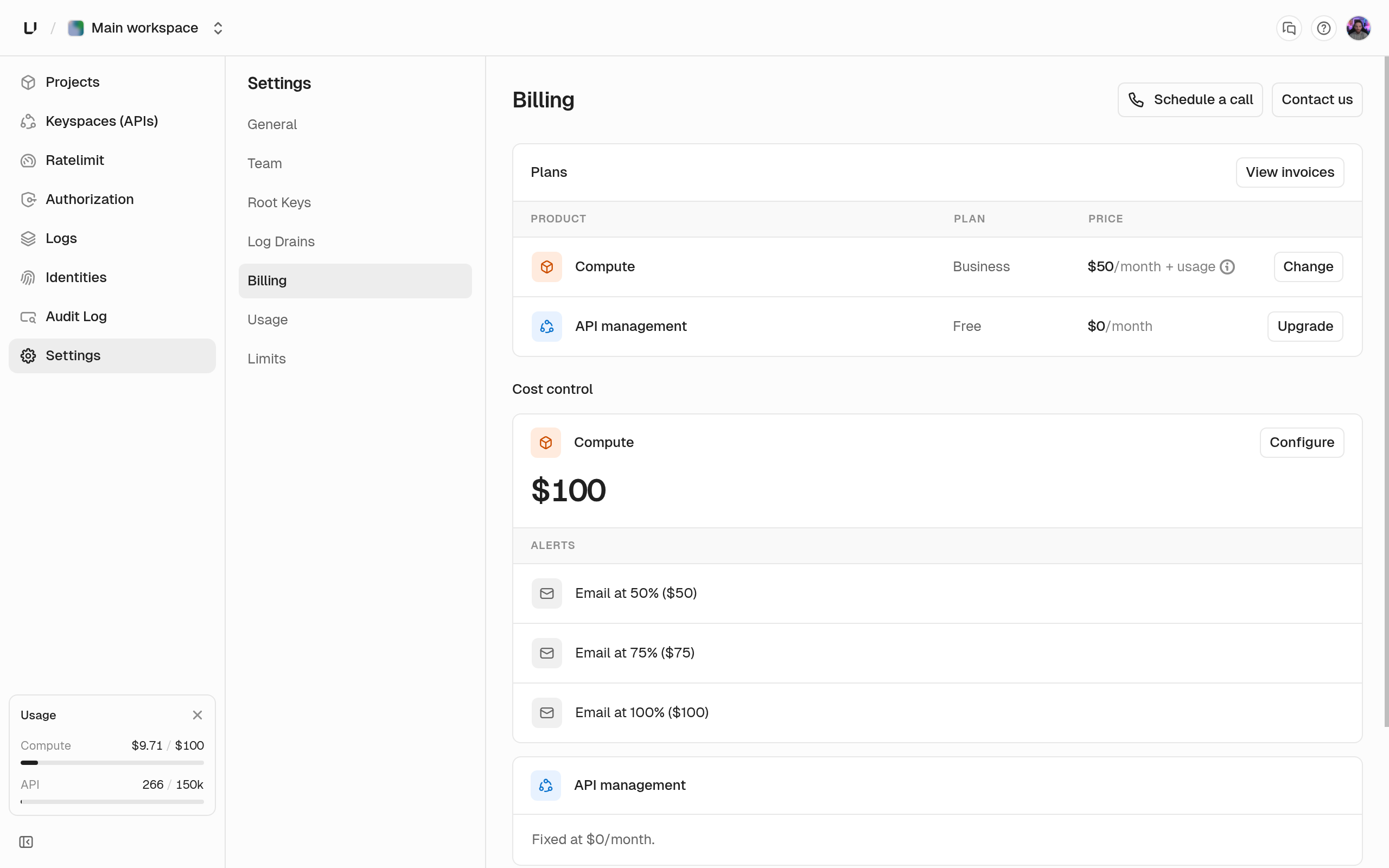
A spend budget caps what Compute usage can cost you in a month. You get emails as you approach it, and you can choose to stop everything when you reach it. Set it under **Settings > Billing**. Only workspace admins can change it. See [Plans](/docs/platform/billing/plans) for how Compute billing works.

## Set a budget

Enter a whole dollar amount up to \$10,000,000, or leave the field empty for no budget. The budget covers usage for the current calendar month across all five Compute meters: CPU, memory, disk, egress, and active keys. It counts usage before any included credit is subtracted, and doesn't include the plan fee.

With a budget set, we email workspace admins the first time spend crosses 50, 75, and 100 percent of it, once per threshold per month. If you raise the budget, the thresholds move with it. Alerts already sent aren't sent again.

<Frame>
  <img src="https://mintcdn.com/unkey/TjbnJStfcJRkiuek/images/dashboard/platform--billing-plans--billing.png?fit=max&auto=format&n=TjbnJStfcJRkiuek&q=85&s=25b8105960bd3bd1c2db90233d2e6d2c" alt="Billing settings page showing the Compute and API management plans with Change and Upgrade buttons, and the Compute cost control budget with its email alerts" width="2560" height="1600" data-path="images/dashboard/platform--billing-plans--billing.png" />
</Frame>

## Stop when you hit the budget

**Stop workloads at the budget** is off by default, and you need a budget before you can turn it on. When it's on and spend reaches 100 percent, we suspend Compute for the rest of the month:

* Every running deployment is stopped. We remember which one was live for each app so we can bring it back.
* Every request to the workspace's domains gets `402` with `spend_limit_reached`.
* You can't start, wake, or create deployments.
* The dashboard shows the workspace as paused by its spend cap.

This isn't cancellation. Your plan, settings, environment variables, domains, and deployment history stay. Nothing is billed while nothing runs.

<ProductLink product="platform" href="/docs/errors/frontline/capacity/spend_limit_reached" title="err:frontline:capacity:spend_limit_reached">
  The 402 response body callers receive while a workspace is suspended, and how to tell it apart from a stopped deployment.
</ProductLink>

## Resume compute

Do one of these, and each app's live deployment starts again. You don't need to redeploy.

* **Remove the budget or turn off Stop workloads at the budget.** Compute resumes at the next check.
* **Raise the budget.** Compute resumes once spend has been under the new budget for two checks in a row.
* **Wait for the next month.** Compute resumes on its own when the new billing month starts.

If someone promoted a different deployment while Compute was suspended, we don't wake the old one.

## Budget vs limits

The budget is about money. [Compute limits](/docs/compute/configure/limits) are about resources: they stop a deployment from using more CPU, memory, or disk than your plan allows, before it runs. The budget acts on what you've actually used this month. Use the budget to control cost, and limits to control size.

## Next steps

<Columns cols={2}>
  <Card title="Compute plans" icon="credit-card" href="/docs/compute/get-started/plans">
    What the plan includes and what is metered above it.
  </Card>

  <Card title="Usage" icon="chart-line" href="/docs/platform/billing/usage">
    What your workspace consumed this month.
  </Card>
</Columns>
