> ## Documentation Index
> Fetch the complete documentation index at: https://unkey.com/docs/llms.txt
> Use this file to discover all available pages before exploring further.
> ## Agent Instructions
> Unkey is two separate products. Compute builds, deploys, and runs apps behind a gateway. API Management issues API keys, enforces rate limits, manages identities and permissions, and reports usage. Say which product a page belongs to; a reader can use either without the other.
> Every Unkey API endpoint is an HTTP POST to https://api.unkey.com/v2/{service}.{procedure} with a root key in the Authorization: Bearer header. Root keys are workspace scoped.
> Error codes have the form err:{system}:{category}:{specific} and each has a page at /errors/{system}/{category}/{specific}.
> The word environment means production or preview in Compute. Rate limiting has four meanings on this site; the glossary lists them.
# Runtime settings
> Every runtime setting an environment has, with defaults, steps, and plan caps.
Runtime settings control how big your container is, how it starts and stops, and where it runs. Each environment of an app has its own.
## Change runtime settings
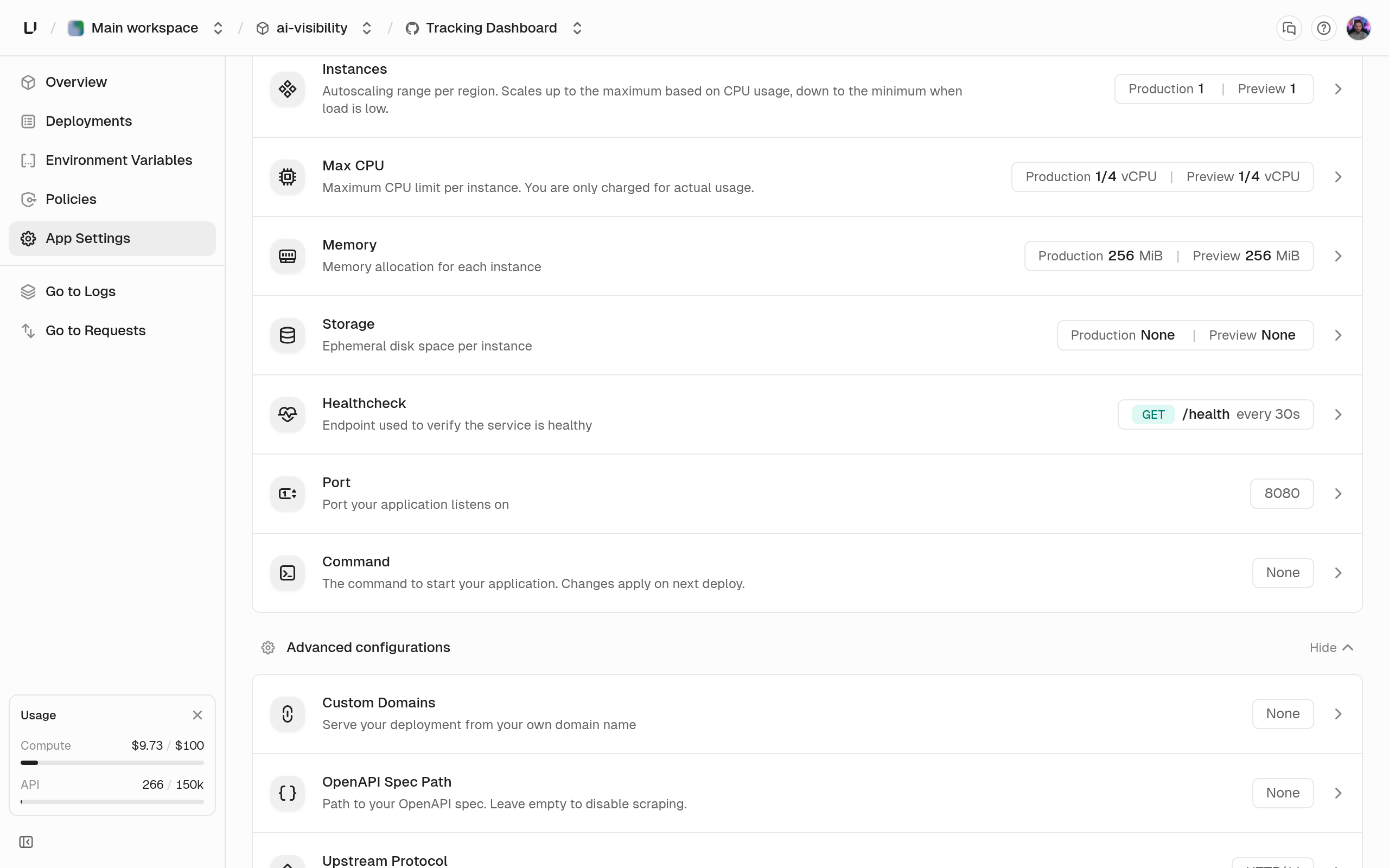
Edit them under **App Settings** in the dashboard, with `environments.updateSettings` in the API, or with `unkey api environments update-settings` in the CLI. In the API, send only the fields you want to change. `environments.getEnvironment` returns the current values under `runtime` and `regions`.
 A change applies from the next deployment. Running deployments keep what they started with, so to apply a change without new code, redeploy the current deployment.
Your plan caps CPU, memory, and disk per instance. Going over returns `400` with a message like "CPU per instance cannot exceed 2 vCPU. Contact [support@unkey.com](mailto:support@unkey.com) to increase it." See [Compute limits](/docs/compute/configure/limits).
## Container
The port your container listens on, 1 to 65535. We set it as the `PORT` environment variable, overriding any value in the image, and send traffic and health checks to it. A port outside the range fails the deployment with `invalid_runtime_settings`.
CPU per instance in vCPUs, at least 0.25, in steps of 0.25, up to your plan's limit. An instance can use up to this much and is always guaranteed at least half. The dashboard offers 1/4, 1/2, 1, 2, 4, 8, and 16 vCPU, up to what your plan allows.
Memory per instance in MiB, at least 256, in steps of 256, up to your plan's limit. It's a hard limit: an instance that goes over is killed and restarted, and the dashboard shows `OOMKilled` with exit code 137. The dashboard offers 256 MiB, 512 MiB, and 1, 2, 4, 8, 16, and 32 GiB, up to what your plan allows.
Temporary disk per instance in MiB, in steps of 512, up to your plan's limit. `0` means none. When set, each instance gets its own disk at `/data`, and `UNKEY_EPHEMERAL_DISK_PATH` is set to `/data`. Nothing on it survives a restart or a new deployment. Without it, the container can write at most 128 MiB. The dashboard offers None, 512 MiB, and 1, 2, 5, 10, 20, and 50 GiB, up to what your plan allows.
Replaces the image's command, as an array of up to 10 strings of up to 4096 characters each. An empty array runs the image's own command. The dashboard splits a single line on spaces and ignores quotes, so use the API when an argument contains spaces.
The signal your container's main process gets when an instance is replaced or scaled in. Set it with the API or CLI. It isn't in the dashboard.
How the gateway talks to your container. `http1` is HTTP/1.1 and works with every framework. `h2c` is HTTP/2 without TLS. Choose it only if your server supports h2c.
The path where your app serves its OpenAPI document, for example `/openapi.yaml`. 1 to 512 characters, starting with `/` and matching `^(/[\w\-]+)+(\.[\w]+)?$`. When a deployment is `ready`, we fetch the document with a `GET` and save it with that deployment. Documents up to 10 MiB are accepted, and a `404` means the deployment has no spec. The spec is used by the gateway's OpenAPI validation policy and the dashboard's spec diff. Send `null`, or leave the dashboard field empty, to turn this off.
An HTTP check we run against each instance. See [Health checks](/docs/compute/configure/health-checks). Send `null` to remove it.
## Regions and replicas
The regions the environment runs in, 1 to 5 entries, each like `{ "name": "us-east-1", "replicas": { "min": 1, "max": 3 } }`. The list replaces the whole set, so regions you leave out are removed. The dashboard's **Regions** and **Instances** cards edit this field.
* The region must be available, or you get "Region 'x' is not available for scheduling."
* Each region can appear once.
* `min` is at least 1. `max` is at least `min` and at most your plan's replicas-per-region limit.
* Every region must use the same bounds, or you get "All regions must specify the same replica bounds; per-region autoscaling is not supported yet."
A new app starts in one region, `ap-southeast-1` (Singapore), with `min` and `max` both 1, so autoscaling is off until you raise `max`. Pick your regions before you go live. See [Regions](/docs/compute/concepts/regions).
## Raise resources and add a region
```bash Raise resources and add a second region theme={"system"}
curl -X POST https://api.unkey.com/v2/environments.updateSettings \
-H "Authorization: Bearer $UNKEY_ROOT_KEY" \
-H "Content-Type: application/json" \
-d '{
"project": "payments",
"app": "api",
"environment": "production",
"vCpus": 1,
"memoryMib": 1024,
"regions": [
{ "name": "us-east-1", "replicas": { "min": 2, "max": 4 } },
{ "name": "eu-central-1", "replicas": { "min": 2, "max": 4 } }
]
}'
```
The dashboard's **Regions** card lists the regions you can use. The change applies from the next deployment.
## Next steps
Probe fields, defaults, and what a failing probe does.
What the allocation and replica bounds mean at runtime.
The per-instance and workspace ceilings behind the `400`s.
How regions are discovered, chosen, and used for failover.
A change applies from the next deployment. Running deployments keep what they started with, so to apply a change without new code, redeploy the current deployment.
Your plan caps CPU, memory, and disk per instance. Going over returns `400` with a message like "CPU per instance cannot exceed 2 vCPU. Contact [support@unkey.com](mailto:support@unkey.com) to increase it." See [Compute limits](/docs/compute/configure/limits).
## Container
The port your container listens on, 1 to 65535. We set it as the `PORT` environment variable, overriding any value in the image, and send traffic and health checks to it. A port outside the range fails the deployment with `invalid_runtime_settings`.
CPU per instance in vCPUs, at least 0.25, in steps of 0.25, up to your plan's limit. An instance can use up to this much and is always guaranteed at least half. The dashboard offers 1/4, 1/2, 1, 2, 4, 8, and 16 vCPU, up to what your plan allows.
Memory per instance in MiB, at least 256, in steps of 256, up to your plan's limit. It's a hard limit: an instance that goes over is killed and restarted, and the dashboard shows `OOMKilled` with exit code 137. The dashboard offers 256 MiB, 512 MiB, and 1, 2, 4, 8, 16, and 32 GiB, up to what your plan allows.
Temporary disk per instance in MiB, in steps of 512, up to your plan's limit. `0` means none. When set, each instance gets its own disk at `/data`, and `UNKEY_EPHEMERAL_DISK_PATH` is set to `/data`. Nothing on it survives a restart or a new deployment. Without it, the container can write at most 128 MiB. The dashboard offers None, 512 MiB, and 1, 2, 5, 10, 20, and 50 GiB, up to what your plan allows.
Replaces the image's command, as an array of up to 10 strings of up to 4096 characters each. An empty array runs the image's own command. The dashboard splits a single line on spaces and ignores quotes, so use the API when an argument contains spaces.
The signal your container's main process gets when an instance is replaced or scaled in. Set it with the API or CLI. It isn't in the dashboard.
How the gateway talks to your container. `http1` is HTTP/1.1 and works with every framework. `h2c` is HTTP/2 without TLS. Choose it only if your server supports h2c.
The path where your app serves its OpenAPI document, for example `/openapi.yaml`. 1 to 512 characters, starting with `/` and matching `^(/[\w\-]+)+(\.[\w]+)?$`. When a deployment is `ready`, we fetch the document with a `GET` and save it with that deployment. Documents up to 10 MiB are accepted, and a `404` means the deployment has no spec. The spec is used by the gateway's OpenAPI validation policy and the dashboard's spec diff. Send `null`, or leave the dashboard field empty, to turn this off.
An HTTP check we run against each instance. See [Health checks](/docs/compute/configure/health-checks). Send `null` to remove it.
## Regions and replicas
The regions the environment runs in, 1 to 5 entries, each like `{ "name": "us-east-1", "replicas": { "min": 1, "max": 3 } }`. The list replaces the whole set, so regions you leave out are removed. The dashboard's **Regions** and **Instances** cards edit this field.
* The region must be available, or you get "Region 'x' is not available for scheduling."
* Each region can appear once.
* `min` is at least 1. `max` is at least `min` and at most your plan's replicas-per-region limit.
* Every region must use the same bounds, or you get "All regions must specify the same replica bounds; per-region autoscaling is not supported yet."
A new app starts in one region, `ap-southeast-1` (Singapore), with `min` and `max` both 1, so autoscaling is off until you raise `max`. Pick your regions before you go live. See [Regions](/docs/compute/concepts/regions).
## Raise resources and add a region
```bash Raise resources and add a second region theme={"system"}
curl -X POST https://api.unkey.com/v2/environments.updateSettings \
-H "Authorization: Bearer $UNKEY_ROOT_KEY" \
-H "Content-Type: application/json" \
-d '{
"project": "payments",
"app": "api",
"environment": "production",
"vCpus": 1,
"memoryMib": 1024,
"regions": [
{ "name": "us-east-1", "replicas": { "min": 2, "max": 4 } },
{ "name": "eu-central-1", "replicas": { "min": 2, "max": 4 } }
]
}'
```
The dashboard's **Regions** card lists the regions you can use. The change applies from the next deployment.
## Next steps
Probe fields, defaults, and what a failing probe does.
What the allocation and replica bounds mean at runtime.
The per-instance and workspace ceilings behind the `400`s.
How regions are discovered, chosen, and used for failover.