> ## Documentation Index
> Fetch the complete documentation index at: https://unkey.com/docs/llms.txt
> Use this file to discover all available pages before exploring further.
> ## Agent Instructions
> Unkey is two separate products. Compute builds, deploys, and runs apps behind a gateway. API Management issues API keys, enforces rate limits, manages identities and permissions, and reports usage. Say which product a page belongs to; a reader can use either without the other.
> Every Unkey API endpoint is an HTTP POST to https://api.unkey.com/v2/{service}.{procedure} with a root key in the Authorization: Bearer header. Root keys are workspace scoped.
> Error codes have the form err:{system}:{category}:{specific} and each has a page at /errors/{system}/{category}/{specific}.
> The word environment means production or preview in Compute. Rate limiting has four meanings on this site; the glossary lists them.
# Compute limits
> The resource limits on your apps, per plan, and what happens when you hit one.
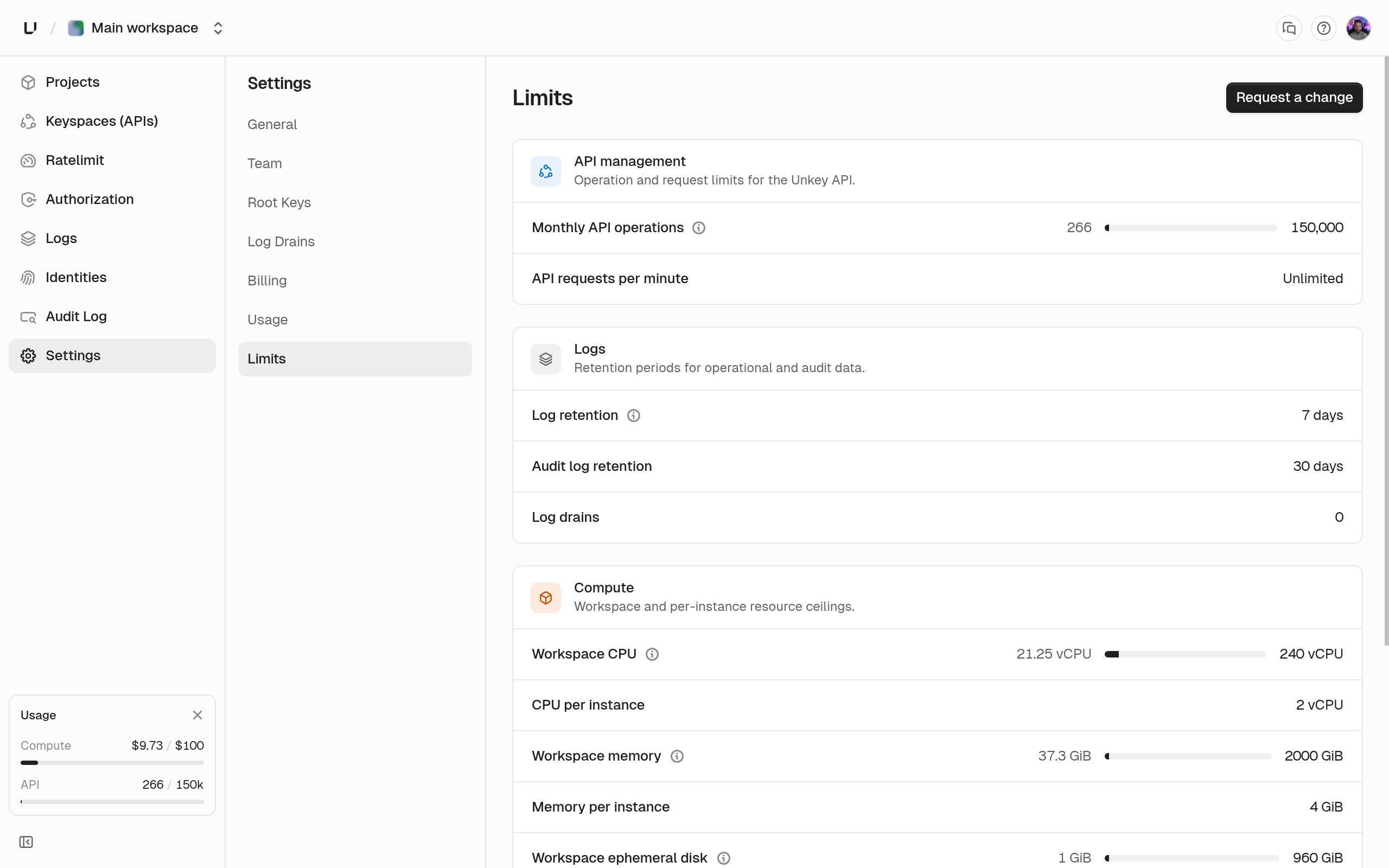
Your Compute plan sets how much CPU, memory, and disk your apps can use. Here's each limit, when we check it, and what you see when you hit it. The full workspace table, including API Management, is on [Limits](/docs/platform/billing/limits).
**Settings > Limits** shows these limits with your current usage once you have a Compute plan. A limit you've reached shows the banner "You've reached a limit".
 ## Limits per plan
| Limit | Starter | Pro | Business | Checked |
| - | - | - | - | - |
| CPU per instance | 2 vCPU | 8 vCPU | 16 vCPU | When you save runtime settings |
| Memory per instance | 2 GiB | 8 GiB | 32 GiB | When you save runtime settings |
| Ephemeral disk per instance | 10 GiB | 10 GiB | 10 GiB | When you save runtime settings |
| Workspace CPU | 30 vCPU | 120 vCPU | 240 vCPU | When a deployment starts |
| Workspace memory | 60 GiB | 240 GiB | 480 GiB | When a deployment starts |
| Workspace ephemeral disk | 120 GiB | 480 GiB | 960 GiB | When a deployment starts |
| Replicas per region | 4 | 8 | 16 | When you save regions |
| Concurrent builds | 1 | 1 | 1 | While deployments are in flight |
| Custom domains per workspace | 1 | Unlimited | Unlimited | When you add a domain |
| Log query range | 3 days | 7 days | 14 days | On every analytics API query |
Without a Compute plan you can't deploy. See [Compute plans](/docs/compute/get-started/plans). "Unlimited" custom domains has a very high cap to stop abuse. Need a higher limit on your plan? Ask [support@unkey.com](mailto:support@unkey.com).
## Saving a size over your plan's limit
CPU, memory, and disk in [runtime settings](/docs/compute/configure/runtime-settings) are checked when you save them. Go over and you get `400` with a message like "Memory per instance cannot exceed 2048 MiB. Contact [support@unkey.com](mailto:support@unkey.com) to increase it." The dashboard only offers sizes your plan allows, so you'll only see this error from the API or CLI.
## A deployment fails with a quota error
Workspace CPU, memory, and disk are checked when a deployment starts `deploying`, because they depend on what's already running. We add up what all your running instances use, plus this deployment's CPU, memory, and disk at its **maximum** replicas in each region. If the total is over a limit, the deployment fails with `cpu_quota_exceeded`, `memory_quota_exceeded`, or `storage_quota_exceeded` and the message "We are unable to deploy this application as you have exceeded your CPU quota" (or Memory, or Storage).
Because the check uses maximum replicas, an environment with a wide autoscaling range counts at its maximum even while it runs at the minimum.
To make room, lower an environment's maximum replicas or stop preview deployments. Replaced production deployments also stop on their own after 30 minutes, and idle previews after an hour.
## Replicas per region
Each region's `max` replicas can't go above your plan's limit, and `min` is at least 1. Go over and you get `400` with, on Starter, "Region 'x' replicas must be between 1 and 4." On every plan, all regions in an environment must use the same bounds, and an environment can have at most 5 regions.
## Deployments wait their turn
Every plan runs one deployment at a time per workspace. Others wait in `pending` for up to an hour, production ahead of preview, and fail if their turn doesn't come. See [Builds](/docs/compute/build/overview).
## Custom domain limit reached
Adding a domain over your limit fails with `err:unkey:limits:custom_domain_limit_exceeded`. The dashboard shows "Custom domain limit reached" with links to your limits and to upgrade. Removing a domain frees up room.
## Log query range
The log query range limits how far back an analytics API query can reach. It's separate from how long we keep the data, and you can read whichever is shorter:
* Request log rows are stored for 7 days, so a Business workspace reads at most 7 days of them even though its query range allows 14.
* Runtime logs are stored for about 90 days, so a Starter workspace reads at most 3 days of them even though the rows exist for far longer.
A query that reaches further back than your plan allows fails with [`err:user:bad_request:query_range_exceeds_retention`](/docs/errors/user/bad_request/query_range_exceeds_retention) instead of returning partial results. This only applies to the [analytics API](/docs/compute/observe/analytics-api), not the dashboard's log views. See [Observability](/docs/compute/observe/overview) for how long data is kept.
## Limits that are the same on every plan
| What | Limit |
| - | - |
| Regions per environment | 5 |
| Watch paths | 10 patterns of up to 500 characters |
| Build command | 1000 characters |
| Container command | 10 arguments of up to 4096 characters |
| Environment variables per request | 50; key up to 256 characters, value up to 16384 bytes |
| Gateway policies per environment | 50, with up to 10 match expressions each |
## What has no limit
There's no limit on the number of projects, apps, or deployments in a workspace, or on the number of environment variables in an environment. Every app has exactly two environments. Compute is billed by what runs, so the limits are on CPU, memory, and disk, not on how many things you create.
## Next steps
The full workspace table, including API Management and log rows.
Cap monthly Compute spend instead of resources.
## Limits per plan
| Limit | Starter | Pro | Business | Checked |
| - | - | - | - | - |
| CPU per instance | 2 vCPU | 8 vCPU | 16 vCPU | When you save runtime settings |
| Memory per instance | 2 GiB | 8 GiB | 32 GiB | When you save runtime settings |
| Ephemeral disk per instance | 10 GiB | 10 GiB | 10 GiB | When you save runtime settings |
| Workspace CPU | 30 vCPU | 120 vCPU | 240 vCPU | When a deployment starts |
| Workspace memory | 60 GiB | 240 GiB | 480 GiB | When a deployment starts |
| Workspace ephemeral disk | 120 GiB | 480 GiB | 960 GiB | When a deployment starts |
| Replicas per region | 4 | 8 | 16 | When you save regions |
| Concurrent builds | 1 | 1 | 1 | While deployments are in flight |
| Custom domains per workspace | 1 | Unlimited | Unlimited | When you add a domain |
| Log query range | 3 days | 7 days | 14 days | On every analytics API query |
Without a Compute plan you can't deploy. See [Compute plans](/docs/compute/get-started/plans). "Unlimited" custom domains has a very high cap to stop abuse. Need a higher limit on your plan? Ask [support@unkey.com](mailto:support@unkey.com).
## Saving a size over your plan's limit
CPU, memory, and disk in [runtime settings](/docs/compute/configure/runtime-settings) are checked when you save them. Go over and you get `400` with a message like "Memory per instance cannot exceed 2048 MiB. Contact [support@unkey.com](mailto:support@unkey.com) to increase it." The dashboard only offers sizes your plan allows, so you'll only see this error from the API or CLI.
## A deployment fails with a quota error
Workspace CPU, memory, and disk are checked when a deployment starts `deploying`, because they depend on what's already running. We add up what all your running instances use, plus this deployment's CPU, memory, and disk at its **maximum** replicas in each region. If the total is over a limit, the deployment fails with `cpu_quota_exceeded`, `memory_quota_exceeded`, or `storage_quota_exceeded` and the message "We are unable to deploy this application as you have exceeded your CPU quota" (or Memory, or Storage).
Because the check uses maximum replicas, an environment with a wide autoscaling range counts at its maximum even while it runs at the minimum.
To make room, lower an environment's maximum replicas or stop preview deployments. Replaced production deployments also stop on their own after 30 minutes, and idle previews after an hour.
## Replicas per region
Each region's `max` replicas can't go above your plan's limit, and `min` is at least 1. Go over and you get `400` with, on Starter, "Region 'x' replicas must be between 1 and 4." On every plan, all regions in an environment must use the same bounds, and an environment can have at most 5 regions.
## Deployments wait their turn
Every plan runs one deployment at a time per workspace. Others wait in `pending` for up to an hour, production ahead of preview, and fail if their turn doesn't come. See [Builds](/docs/compute/build/overview).
## Custom domain limit reached
Adding a domain over your limit fails with `err:unkey:limits:custom_domain_limit_exceeded`. The dashboard shows "Custom domain limit reached" with links to your limits and to upgrade. Removing a domain frees up room.
## Log query range
The log query range limits how far back an analytics API query can reach. It's separate from how long we keep the data, and you can read whichever is shorter:
* Request log rows are stored for 7 days, so a Business workspace reads at most 7 days of them even though its query range allows 14.
* Runtime logs are stored for about 90 days, so a Starter workspace reads at most 3 days of them even though the rows exist for far longer.
A query that reaches further back than your plan allows fails with [`err:user:bad_request:query_range_exceeds_retention`](/docs/errors/user/bad_request/query_range_exceeds_retention) instead of returning partial results. This only applies to the [analytics API](/docs/compute/observe/analytics-api), not the dashboard's log views. See [Observability](/docs/compute/observe/overview) for how long data is kept.
## Limits that are the same on every plan
| What | Limit |
| - | - |
| Regions per environment | 5 |
| Watch paths | 10 patterns of up to 500 characters |
| Build command | 1000 characters |
| Container command | 10 arguments of up to 4096 characters |
| Environment variables per request | 50; key up to 256 characters, value up to 16384 bytes |
| Gateway policies per environment | 50, with up to 10 match expressions each |
## What has no limit
There's no limit on the number of projects, apps, or deployments in a workspace, or on the number of environment variables in an environment. Every app has exactly two environments. Compute is billed by what runs, so the limits are on CPU, memory, and disk, not on how many things you create.
## Next steps
The full workspace table, including API Management and log rows.
Cap monthly Compute spend instead of resources.