> ## Documentation Index
> Fetch the complete documentation index at: https://unkey.com/docs/llms.txt
> Use this file to discover all available pages before exploring further.
> ## Agent Instructions
> Unkey is two separate products. Compute builds, deploys, and runs apps behind a gateway. API Management issues API keys, enforces rate limits, manages identities and permissions, and reports usage. Say which product a page belongs to; a reader can use either without the other.
> Every Unkey API endpoint is an HTTP POST to https://api.unkey.com/v2/{service}.{procedure} with a root key in the Authorization: Bearer header. Root keys are workspace scoped.
> Error codes have the form err:{system}:{category}:{specific} and each has a page at /errors/{system}/{category}/{specific}.
> The word environment means production or preview in Compute. Rate limiting has four meanings on this site; the glossary lists them.
# Build settings
> Every build setting an environment has, with defaults and validation rules.
Build settings control how a git-connected app is built, and which pushes build at all. Each environment has its own, so production and preview can differ. Apps deployed from an image have no build settings.
## Change build settings
Edit them under **App Settings** in the dashboard, with `environments.updateSettings` in the API, or with `unkey api environments update-settings` in the CLI. In the API, send only the fields you want to change. To read the current values, call `environments.getEnvironment` and look under `build`.
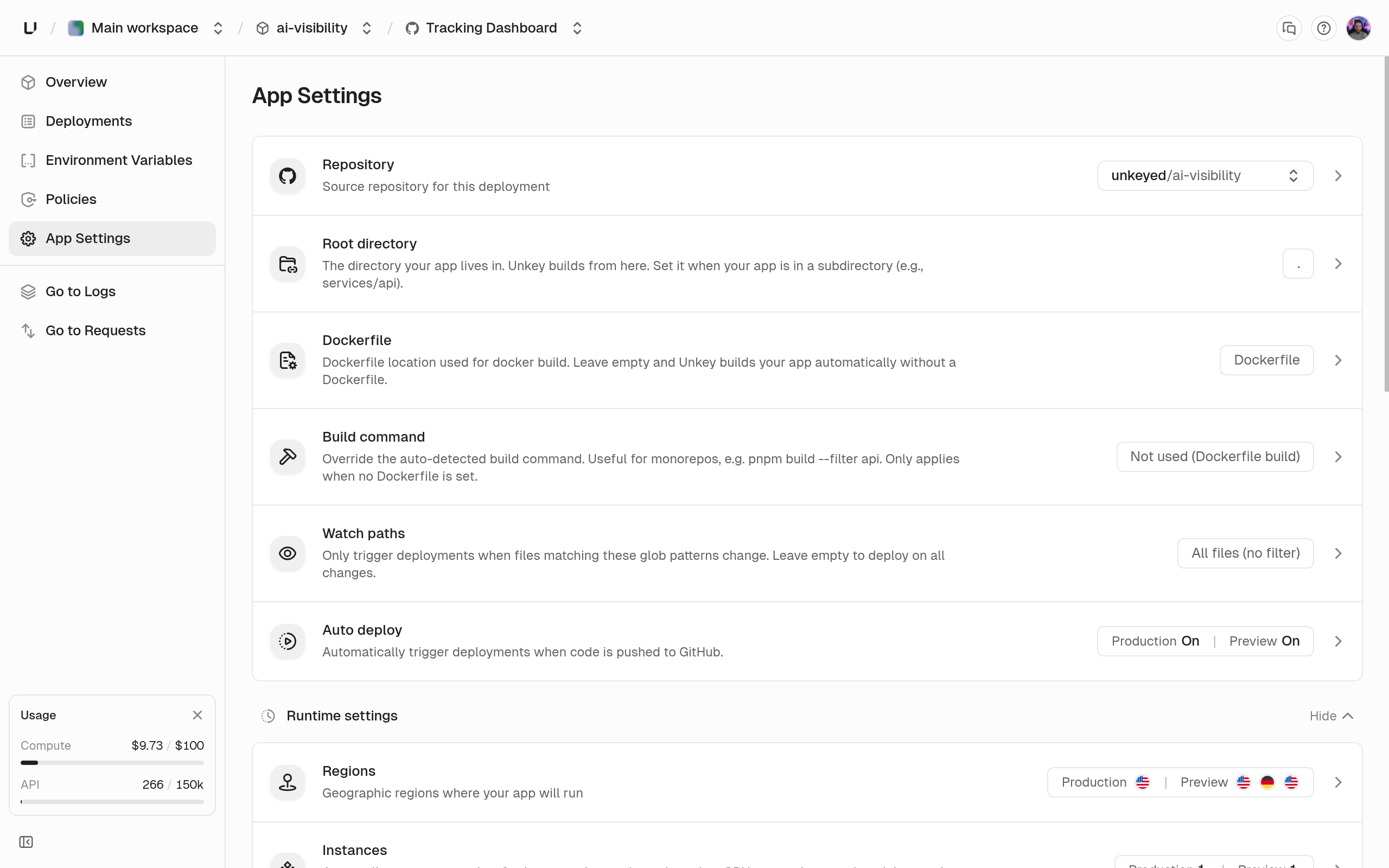 A change applies from the next deployment. Existing deployments keep the settings they were built with.
## Fields
Path to the Dockerfile, relative to the root directory, 1 to 500 characters. When it's unset (the default), we detect your language and build without a Dockerfile. Send `null` to go back to automatic builds. In the dashboard, the **Dockerfile** card lists Dockerfiles in your repository and shows "File not found on this branch" if the path is missing. See [Dockerfile builds](/docs/compute/build/dockerfile).
The directory we build from, 1 to 500 characters. Automatic detection looks here, and a Dockerfile build uses it as the build context. Use `.` or a relative path like `services/api` with letters, digits, `.`, `_`, and `-`. A path that starts with `/` or `./`, or contains `..`, a backslash, or spaces, returns "Root directory must be a relative path like 'api' or 'services/api'." The dashboard suggests app directories it finds in your repository.
Replaces the build command automatic detection would run, 1 to 1000 characters, for example `pnpm --filter api build`. Ignored when a Dockerfile is set, and the dashboard disables the field with "Disabled because a Dockerfile is configured. Build commands only apply to automatic (Railpack) builds." Send `null` to go back to the detected command.
Glob patterns that decide whether a push builds. Up to 10 patterns, each up to 500 characters. When the list is empty, every push builds. Otherwise a push builds only if a changed file matches a pattern. `src/**` matches everything under `src`, and `**/*.go` matches every Go file. A pattern without a wildcard matches only that exact path, so `src` isn't the same as `src/**`. Don't start a pattern with `/` or `./`. An invalid pattern returns `400` when you save it. See [GitHub integration](/docs/compute/build/github).
Whether GitHub pushes create deployments in this environment. When it's off, a push shows up as a `skipped` deployment with "Auto deploy is disabled for this environment." A common setup is auto deploy on for preview and off for production: every branch gets a preview, and you release to production on purpose from the dashboard, API, or CLI.
## Example
```bash Set a Dockerfile and scope the build to a subdirectory theme={"system"}
curl -X POST https://api.unkey.com/v2/environments.updateSettings \
-H "Authorization: Bearer $UNKEY_ROOT_KEY" \
-H "Content-Type: application/json" \
-d '{
"project": "payments",
"app": "api",
"environment": "production",
"rootDirectory": "services/api",
"dockerfile": "Dockerfile",
"watchPaths": ["services/api/**", "packages/shared/**"]
}'
```
## Next steps
How builds run, why they wait or fail, and caching.
Port, CPU, memory, disk, command, protocol, regions.
A change applies from the next deployment. Existing deployments keep the settings they were built with.
## Fields
Path to the Dockerfile, relative to the root directory, 1 to 500 characters. When it's unset (the default), we detect your language and build without a Dockerfile. Send `null` to go back to automatic builds. In the dashboard, the **Dockerfile** card lists Dockerfiles in your repository and shows "File not found on this branch" if the path is missing. See [Dockerfile builds](/docs/compute/build/dockerfile).
The directory we build from, 1 to 500 characters. Automatic detection looks here, and a Dockerfile build uses it as the build context. Use `.` or a relative path like `services/api` with letters, digits, `.`, `_`, and `-`. A path that starts with `/` or `./`, or contains `..`, a backslash, or spaces, returns "Root directory must be a relative path like 'api' or 'services/api'." The dashboard suggests app directories it finds in your repository.
Replaces the build command automatic detection would run, 1 to 1000 characters, for example `pnpm --filter api build`. Ignored when a Dockerfile is set, and the dashboard disables the field with "Disabled because a Dockerfile is configured. Build commands only apply to automatic (Railpack) builds." Send `null` to go back to the detected command.
Glob patterns that decide whether a push builds. Up to 10 patterns, each up to 500 characters. When the list is empty, every push builds. Otherwise a push builds only if a changed file matches a pattern. `src/**` matches everything under `src`, and `**/*.go` matches every Go file. A pattern without a wildcard matches only that exact path, so `src` isn't the same as `src/**`. Don't start a pattern with `/` or `./`. An invalid pattern returns `400` when you save it. See [GitHub integration](/docs/compute/build/github).
Whether GitHub pushes create deployments in this environment. When it's off, a push shows up as a `skipped` deployment with "Auto deploy is disabled for this environment." A common setup is auto deploy on for preview and off for production: every branch gets a preview, and you release to production on purpose from the dashboard, API, or CLI.
## Example
```bash Set a Dockerfile and scope the build to a subdirectory theme={"system"}
curl -X POST https://api.unkey.com/v2/environments.updateSettings \
-H "Authorization: Bearer $UNKEY_ROOT_KEY" \
-H "Content-Type: application/json" \
-d '{
"project": "payments",
"app": "api",
"environment": "production",
"rootDirectory": "services/api",
"dockerfile": "Dockerfile",
"watchPaths": ["services/api/**", "packages/shared/**"]
}'
```
## Next steps
How builds run, why they wait or fail, and caching.
Port, CPU, memory, disk, command, protocol, regions.