> ## Documentation Index
> Fetch the complete documentation index at: https://unkey.com/docs/llms.txt
> Use this file to discover all available pages before exploring further.
> ## Agent Instructions
> Unkey is two separate products. Compute builds, deploys, and runs apps behind a gateway. API Management issues API keys, enforces rate limits, manages identities and permissions, and reports usage. Say which product a page belongs to; a reader can use either without the other.
> Every Unkey API endpoint is an HTTP POST to https://api.unkey.com/v2/{service}.{procedure} with a root key in the Authorization: Bearer header. Root keys are workspace scoped.
> Error codes have the form err:{system}:{category}:{specific} and each has a page at /errors/{system}/{category}/{specific}.
> The word environment means production or preview in Compute. Rate limiting has four meanings on this site; the glossary lists them.
# Key and identity rate limits
> Enforce named rate limits on a key or an identity during verification.
Put named rate limits on a key or identity, and `keys.verifyKey` checks them for you. One call handles both auth and rate limiting. To change a customer's limits, update their key or identity. No deploy needed.
## Define limits
You set limits with `ratelimits` on `keys.createKey`, `keys.updateKey`, `identities.createIdentity`, and `identities.updateIdentity`, up to 50 per key or identity. Each entry has:
3 to 128 characters, unique within the key or identity. You refer to the limit by this name at verification time.
Tokens per window, 1 or more.
Window length in milliseconds, 1000 or more.
`true` checks this limit on every verification. `false` checks it only when a verification names it. Required: leaving it out fails with HTTP 400 and `missing property 'autoApply'`.
```bash theme={"system"}
curl -X POST https://api.unkey.com/v2/keys.createKey \
-H "Authorization: Bearer $UNKEY_ROOT_KEY" \
-H "Content-Type: application/json" \
-d '{
"apiId": "api_...",
"ratelimits": [
{ "name": "requests", "limit": 100, "duration": 60000, "autoApply": true },
{ "name": "exports", "limit": 5, "duration": 3600000, "autoApply": false }
]
}'
```
On `keys.updateKey` and `identities.updateIdentity`, `ratelimits` replaces the whole list. Limits you leave out are deleted and matching names are updated. `null` on `keys.updateKey` removes them all. Leave the field out to keep limits as they are.
## Check limits at verification
Auto-applied limits are always checked. To check any other limit, or to spend a custom cost, list it in the verification's `ratelimits` array.
The name of a limit on the key or its identity, 3 to 255 characters (saved limit names stop at 128; longer names only work for inline limits).
Tokens to spend on this limit for this verification, 0 or more.
With `duration`, defines an inline limit instead of referring to a configured one. See below.
Window in milliseconds for an inline limit. Send it together with `limit`.
```bash theme={"system"}
curl -X POST https://api.unkey.com/v2/keys.verifyKey \
-H "Authorization: Bearer $UNKEY_ROOT_KEY" \
-H "Content-Type: application/json" \
-d '{
"key": "sk_live_...",
"ratelimits": [
{ "name": "exports" },
{ "name": "requests", "cost": 3 }
]
}'
```
All listed limits are checked together. If any is exceeded, none is used up, the verification fails with `code: RATE_LIMITED`, and no credits are spent. Naming a limit that isn't on the key or its identity fails the whole request with HTTP 412 [`err:unkey:application:precondition_failed`](/docs/errors/unkey/application/precondition_failed).
If the rate limit check can't run, the verification carries on as if the limits passed, so an outage never blocks valid keys.
### Inline limits
An entry with both `limit` and `duration` is an inline limit, used for this call only. It counts against the key (never the identity), isn't saved, and has an empty `id` in the response. Use it when your code decides the numbers per endpoint.
An inline limit needs a `limit` of 1 or more and a `duration` of 1000 milliseconds or more. Below that you get no error. Instead the verification skips all rate limits, including auto-applied ones, and `data.ratelimits` comes back empty. Check these values in your code before you send them.
```json theme={"system"}
{ "key": "sk_live_...", "ratelimits": [ { "name": "search", "limit": 20, "duration": 10000 } ] }
```
## What the response contains
Every checked limit appears in `data.ratelimits` with `id`, `name`, `limit`, `duration`, `remaining`, `reset` (Unix milliseconds), `exceeded`, and `autoApply`. If the key has an identity, `data.identity.ratelimits` lists all of the identity's limits, checked or not.
```json theme={"system"}
{
"meta": { "requestId": "req_..." },
"data": {
"valid": false,
"code": "RATE_LIMITED",
"keyId": "key_...",
"ratelimits": [
{ "id": "rl_...", "name": "requests", "limit": 100, "duration": 60000, "remaining": 0, "reset": 1704067260000, "exceeded": true, "autoApply": true }
]
}
}
```
## Key limits and identity limits
A limit on a key counts that key alone. A limit on an identity counts all its keys together, so five keys share one budget. If a key and its identity both have a limit with the same name, the key's limit wins, so you can give one key an exception to a shared limit. [Shared rate limits across keys](/docs/api-management/identities/shared-rate-limits) walks through the identity side.
## From the dashboard
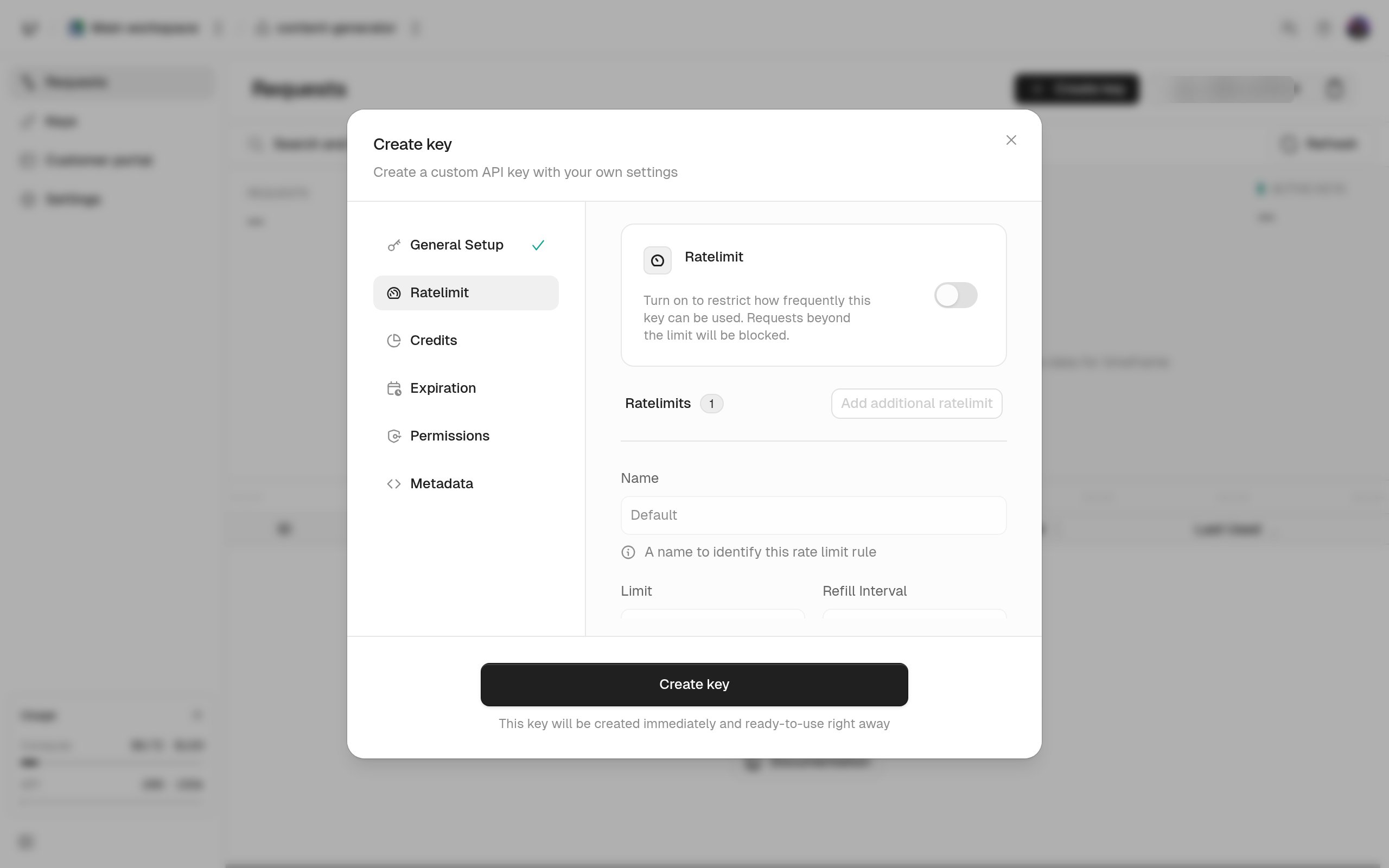
Set the same four fields in the **Create key** dialog's rate limit step, or with **Edit ratelimit** on a key or identity.